> ## Documentation Index
> Fetch the complete documentation index at: https://laminarai-docs-lam-1855-eve-reporter.mintlify.site/llms.txt
> Use this file to discover all available pages before exploring further.
# eve evals with Laminar
Laminar is an open-source, OpenTelemetry-native observability and evaluation platform for AI agents. **The `LaminarReporter` ships [eve](https://eve.dev) eval results to Laminar, so every `eve eval` run lands as a Laminar evaluation you can [compare across runs](/evaluations/comparing-runs), chart over time, and drill into per datapoint.**
[eve](https://eve.dev) is Vercel's filesystem-first framework for building AI agents. Its evals subsystem runs your agent against real sessions, asserts on what it did, and grades the result. eve runs and scores everything itself; a reporter ships those results to a destination. `LaminarReporter` is that destination for Laminar.
 ## How it maps
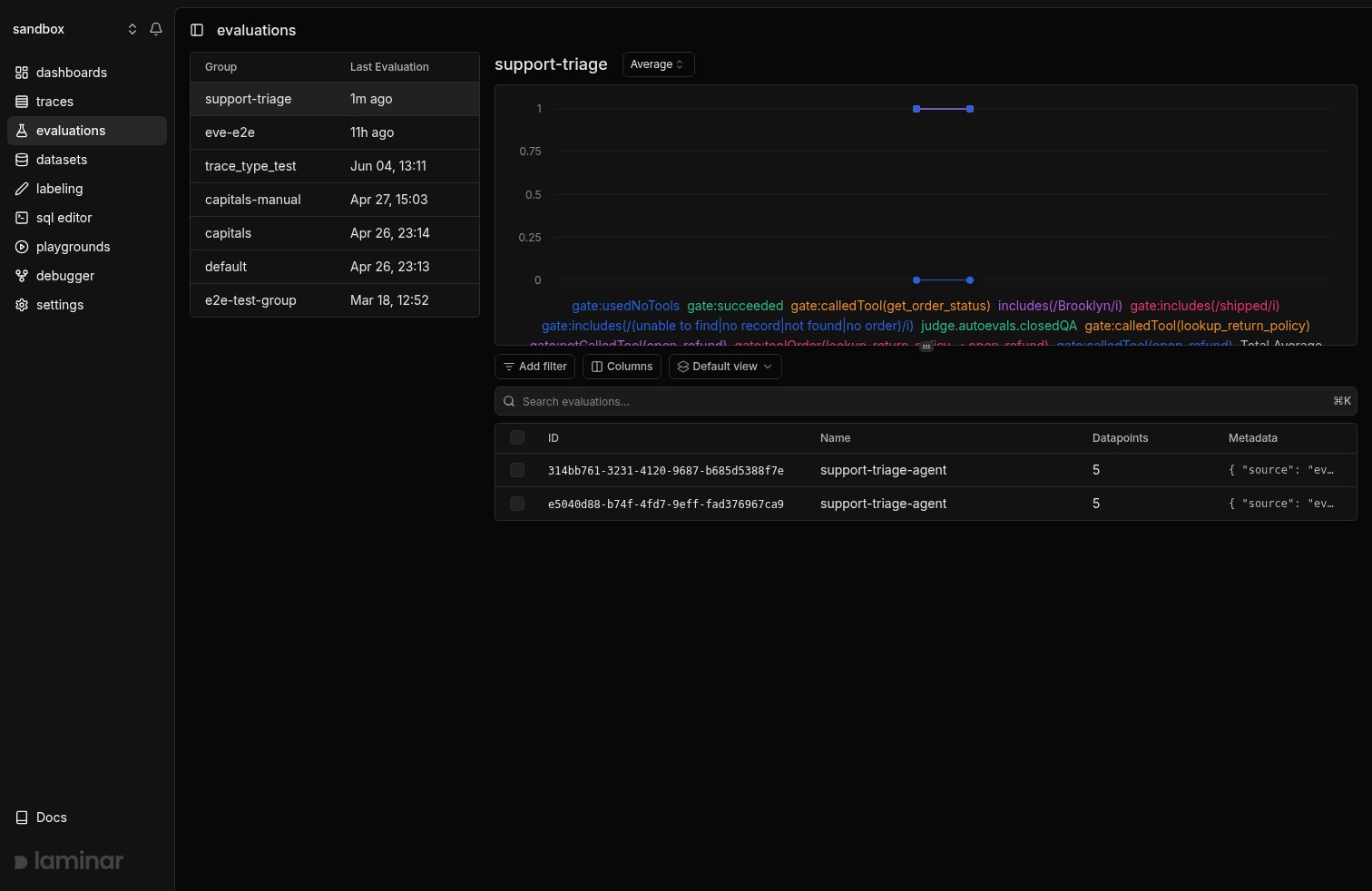
eve grades each eval with assertions and computes a verdict; the reporter translates that into one Laminar evaluation per run with one datapoint per eval:
* **Each eval becomes one datapoint.** The eval's id (`orders/unknown-order`) is the datapoint's input, and eve's verdict, run status, session id, model id, tool-call names, and any failed assertions ride along as datapoint metadata.
* **Assertions become scores.** A graded soft assertion keeps its numeric score under its own name (`judge.autoevals.closedQA`). A gate assertion (or any boolean assertion) becomes a binary `gate:` score, `1` when it passed and `0` when it failed, so Laminar diffs a gate regression the same way it diffs a soft-score drop.
* **The agent's final output becomes the executor output**, visible on every datapoint row.
This is the same gate-score convention eve's own Braintrust reporter uses, so a suite already reporting to Braintrust reads identically in Laminar.
## Prerequisites
To get the project API key, go to the Laminar dashboard, click the project settings,
and generate a project API key. This is available both in the cloud and in the self-hosted version of Laminar.
Specify the key at `Laminar` initialization. If not specified,
Laminar will look for the key in the `LMNR_PROJECT_API_KEY` environment variable.
Add the SDK to your eve agent project:
```bash theme={null}
npm install @lmnr-ai/lmnr
export LMNR_PROJECT_API_KEY=
```
## Register the reporter
Reporters attach in `evals/evals.config.ts` to observe every eval in the run. Add `LaminarReporter` there:
```typescript evals/evals.config.ts {2,6-9} theme={null}
import { defineEvalConfig } from "eve/evals";
import { LaminarReporter } from "@lmnr-ai/lmnr";
export default defineEvalConfig({
reporters: [
new LaminarReporter({
name: "support-triage-agent",
groupName: "support-triage",
}),
],
});
```
* `name` is the evaluation name shown in Laminar. `groupName` ties runs of the same suite together so Laminar charts them over time. Keep `groupName` stable across prompt and model changes.
* The reporter reads `LMNR_PROJECT_API_KEY` from the environment. Pass `projectApiKey` (and `baseUrl` for a self-hosted instance) to the constructor to override it.
To scope a destination to a single eval instead of the whole run, pass `reporters` on that eval's `defineEval` rather than the config.
## Run the evals
Run the suite the way you already do. eve boots the agent, drives each eval, grades it, and hands the result to the reporter:
```bash theme={null}
eve eval
```
When the run finishes, every eval is a datapoint in Laminar under the evaluation you named. The console summary eve prints and the Laminar evaluation describe the same run.
```
EVALS 5
✓ orders/greeting-uses-no-tools gates 2/2
✓ orders/shipped-order gates 3/3 includes(/Brooklyn/i): 100%
✗ orders/unknown-order gates 2/3
✓ refunds/eligible-refund gates 4/4 judge.autoevals.closedQA: 100%
✓ refunds/expired-return-window gates 3/3 judge.autoevals.closedQA: 100%
```
## Read the results
Open the evaluation in Laminar. Each row is one eval; its scores are the gate and soft assertions eve recorded, and the row's output is the agent's final message.
## How it maps
eve grades each eval with assertions and computes a verdict; the reporter translates that into one Laminar evaluation per run with one datapoint per eval:
* **Each eval becomes one datapoint.** The eval's id (`orders/unknown-order`) is the datapoint's input, and eve's verdict, run status, session id, model id, tool-call names, and any failed assertions ride along as datapoint metadata.
* **Assertions become scores.** A graded soft assertion keeps its numeric score under its own name (`judge.autoevals.closedQA`). A gate assertion (or any boolean assertion) becomes a binary `gate:` score, `1` when it passed and `0` when it failed, so Laminar diffs a gate regression the same way it diffs a soft-score drop.
* **The agent's final output becomes the executor output**, visible on every datapoint row.
This is the same gate-score convention eve's own Braintrust reporter uses, so a suite already reporting to Braintrust reads identically in Laminar.
## Prerequisites
To get the project API key, go to the Laminar dashboard, click the project settings,
and generate a project API key. This is available both in the cloud and in the self-hosted version of Laminar.
Specify the key at `Laminar` initialization. If not specified,
Laminar will look for the key in the `LMNR_PROJECT_API_KEY` environment variable.
Add the SDK to your eve agent project:
```bash theme={null}
npm install @lmnr-ai/lmnr
export LMNR_PROJECT_API_KEY=
```
## Register the reporter
Reporters attach in `evals/evals.config.ts` to observe every eval in the run. Add `LaminarReporter` there:
```typescript evals/evals.config.ts {2,6-9} theme={null}
import { defineEvalConfig } from "eve/evals";
import { LaminarReporter } from "@lmnr-ai/lmnr";
export default defineEvalConfig({
reporters: [
new LaminarReporter({
name: "support-triage-agent",
groupName: "support-triage",
}),
],
});
```
* `name` is the evaluation name shown in Laminar. `groupName` ties runs of the same suite together so Laminar charts them over time. Keep `groupName` stable across prompt and model changes.
* The reporter reads `LMNR_PROJECT_API_KEY` from the environment. Pass `projectApiKey` (and `baseUrl` for a self-hosted instance) to the constructor to override it.
To scope a destination to a single eval instead of the whole run, pass `reporters` on that eval's `defineEval` rather than the config.
## Run the evals
Run the suite the way you already do. eve boots the agent, drives each eval, grades it, and hands the result to the reporter:
```bash theme={null}
eve eval
```
When the run finishes, every eval is a datapoint in Laminar under the evaluation you named. The console summary eve prints and the Laminar evaluation describe the same run.
```
EVALS 5
✓ orders/greeting-uses-no-tools gates 2/2
✓ orders/shipped-order gates 3/3 includes(/Brooklyn/i): 100%
✗ orders/unknown-order gates 2/3
✓ refunds/eligible-refund gates 4/4 judge.autoevals.closedQA: 100%
✓ refunds/expired-return-window gates 3/3 judge.autoevals.closedQA: 100%
```
## Read the results
Open the evaluation in Laminar. Each row is one eval; its scores are the gate and soft assertions eve recorded, and the row's output is the agent's final message.
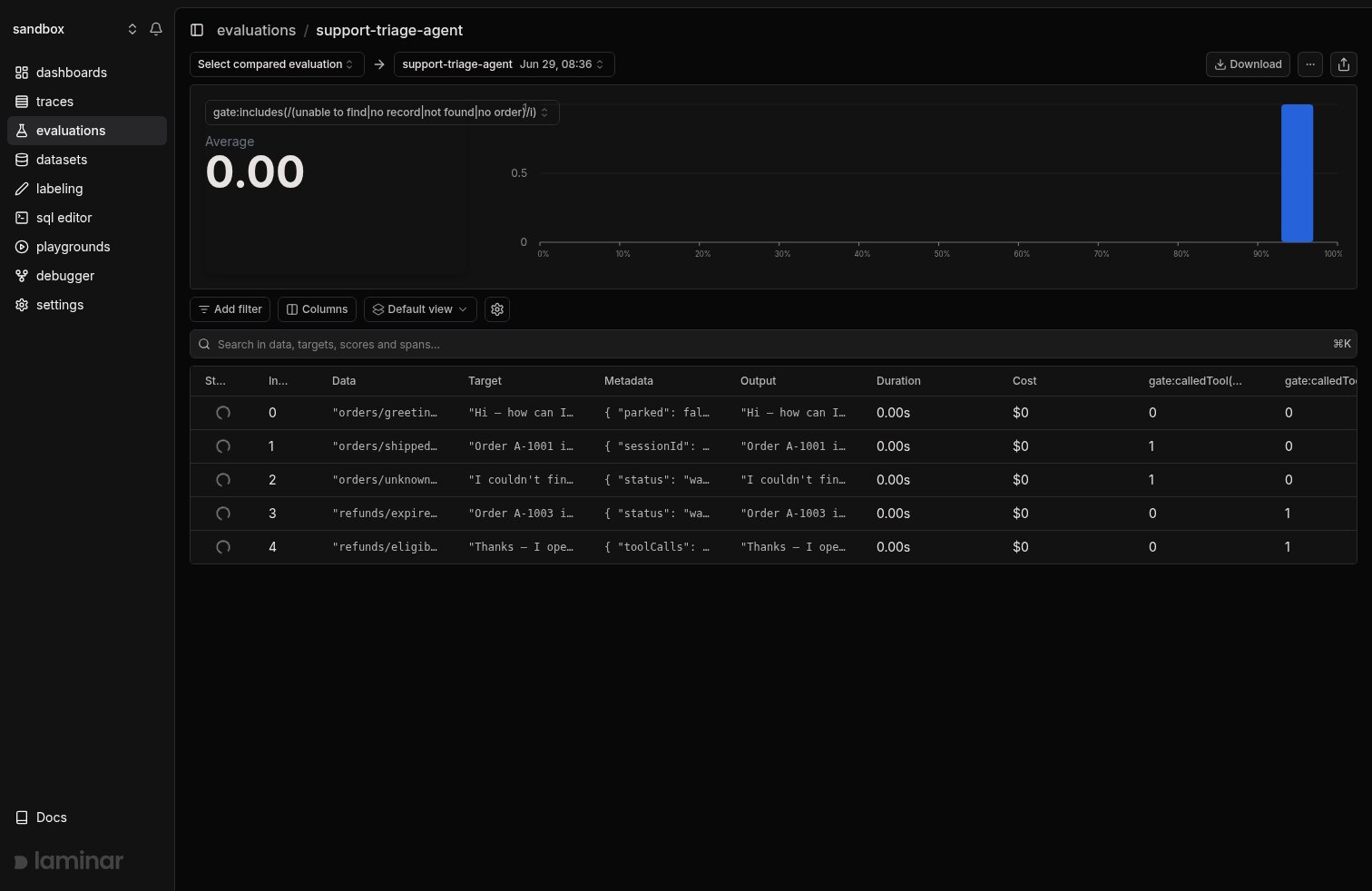 Because `groupName` stays stable, changing a prompt or model and rerunning lands the new run in the same group, and Laminar charts each score dimension over time. A gate that flips from `1` to `0`, or a soft score that drops, is a regression you caught before shipping. See [Compare runs](/evaluations/comparing-runs) for side-by-side diffs and per-datapoint deltas.
## Query the results
eve evaluations are stored like any other Laminar evaluation, so you can query the datapoints across runs:
* [SQL editor](/platform/sql-editor): `SELECT simpleJSONExtractFloat(scores, 'gate:succeeded') FROM evaluation_datapoints WHERE ...`
* SQL API: the same query over HTTP.
* [CLI](/platform/cli): `lmnr-cli sql query`.
* [MCP server](/platform/mcp): ask an agent to query your evaluations.
## Next steps
Group eve runs, read the progression chart, and diff them side by side.
The datapoint, score, and group model the reporter maps eve onto.
The lower-level evals API the reporter is built on.
Query gate and soft scores across every eve run.
Because `groupName` stays stable, changing a prompt or model and rerunning lands the new run in the same group, and Laminar charts each score dimension over time. A gate that flips from `1` to `0`, or a soft score that drops, is a regression you caught before shipping. See [Compare runs](/evaluations/comparing-runs) for side-by-side diffs and per-datapoint deltas.
## Query the results
eve evaluations are stored like any other Laminar evaluation, so you can query the datapoints across runs:
* [SQL editor](/platform/sql-editor): `SELECT simpleJSONExtractFloat(scores, 'gate:succeeded') FROM evaluation_datapoints WHERE ...`
* SQL API: the same query over HTTP.
* [CLI](/platform/cli): `lmnr-cli sql query`.
* [MCP server](/platform/mcp): ask an agent to query your evaluations.
## Next steps
Group eve runs, read the progression chart, and diff them side by side.
The datapoint, score, and group model the reporter maps eve onto.
The lower-level evals API the reporter is built on.
Query gate and soft scores across every eve run.