
LaminarReporter ships eve eval results to Laminar, so every eve eval run lands as a Laminar evaluation you can compare across runs, chart over time, and drill into per datapoint.
eve is Vercel’s filesystem-first framework for building AI agents. Its evals subsystem runs your agent against real sessions, asserts on what it did, and grades the result. eve runs and scores everything itself; a reporter ships those results to a destination. LaminarReporter is that destination for Laminar.
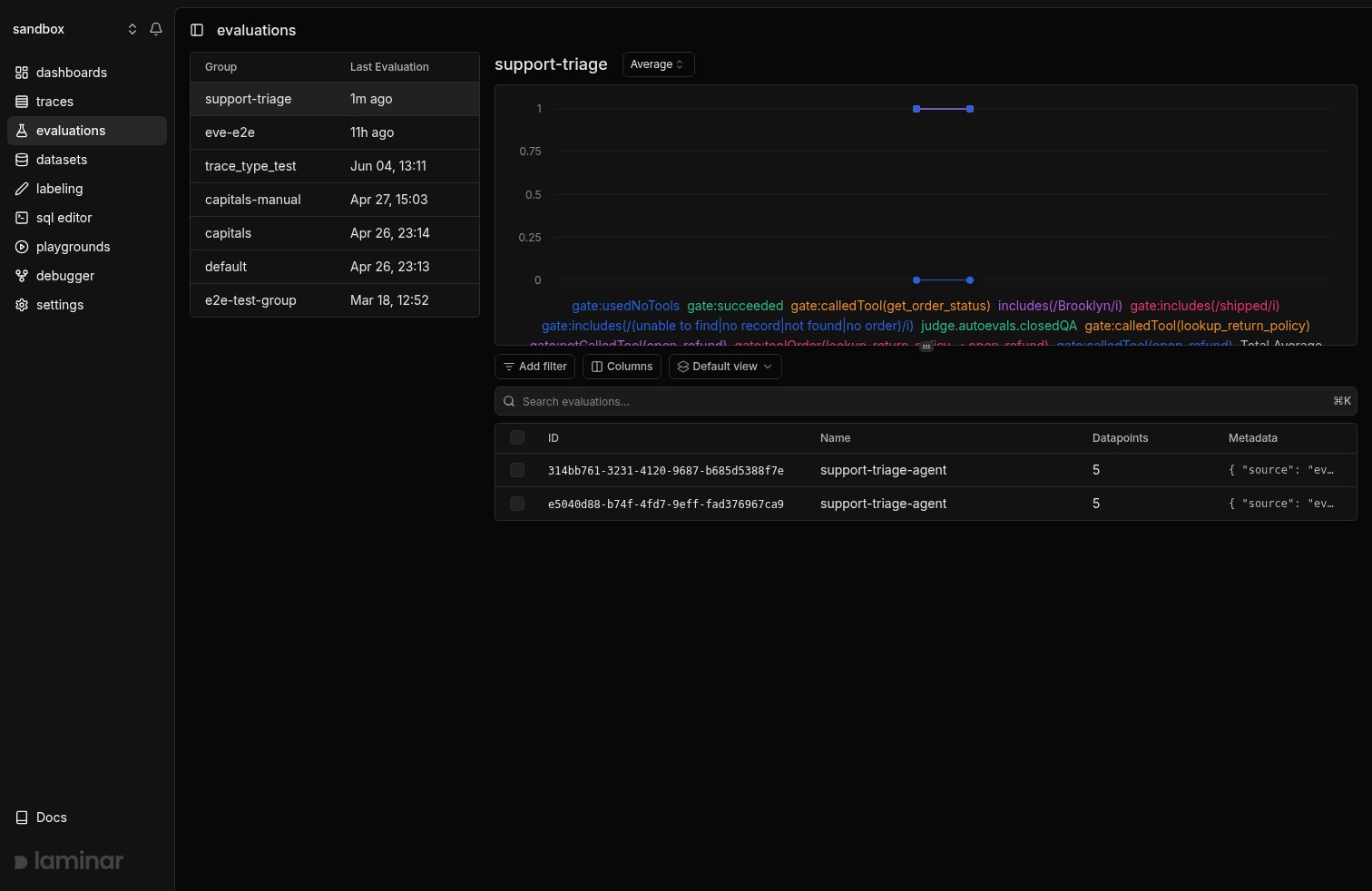
An eve run in Laminar: the support-triage group after two runs, each score dimension charted over time above the run table
How it maps
eve grades each eval with assertions and computes a verdict; the reporter translates that into one Laminar evaluation per run with one datapoint per eval:- Each eval becomes one datapoint. The eval’s id (
orders/unknown-order) is the datapoint’s input, and eve’s verdict, run status, session id, model id, tool-call names, and any failed assertions ride along as datapoint metadata. - Assertions become scores. A graded soft assertion keeps its numeric score under its own name (
judge.autoevals.closedQA). A gate assertion (or any boolean assertion) becomes a binarygate:<name>score,1when it passed and0when it failed, so Laminar diffs a gate regression the same way it diffs a soft-score drop. - The agent’s final output becomes the executor output, visible on every datapoint row.
This is the same gate-score convention eve’s own Braintrust reporter uses, so a suite already reporting to Braintrust reads identically in Laminar.
Prerequisites
To get the project API key, go to the Laminar dashboard, click the project settings, and generate a project API key. This is available both in the cloud and in the self-hosted version of Laminar. Specify the key atLaminar initialization. If not specified,
Laminar will look for the key in the LMNR_PROJECT_API_KEY environment variable.
Add the SDK to your eve agent project:
Register the reporter
Reporters attach inevals/evals.config.ts to observe every eval in the run. Add LaminarReporter there:
evals/evals.config.ts
nameis the evaluation name shown in Laminar.groupNameties runs of the same suite together so Laminar charts them over time. KeepgroupNamestable across prompt and model changes.- The reporter reads
LMNR_PROJECT_API_KEYfrom the environment. PassprojectApiKey(andbaseUrlfor a self-hosted instance) to the constructor to override it.
reporters on that eval’s defineEval rather than the config.
Run the evals
Run the suite the way you already do. eve boots the agent, drives each eval, grades it, and hands the result to the reporter:Read the results
Open the evaluation in Laminar. Each row is one eval; its scores are the gate and soft assertions eve recorded, and the row’s output is the agent’s final message.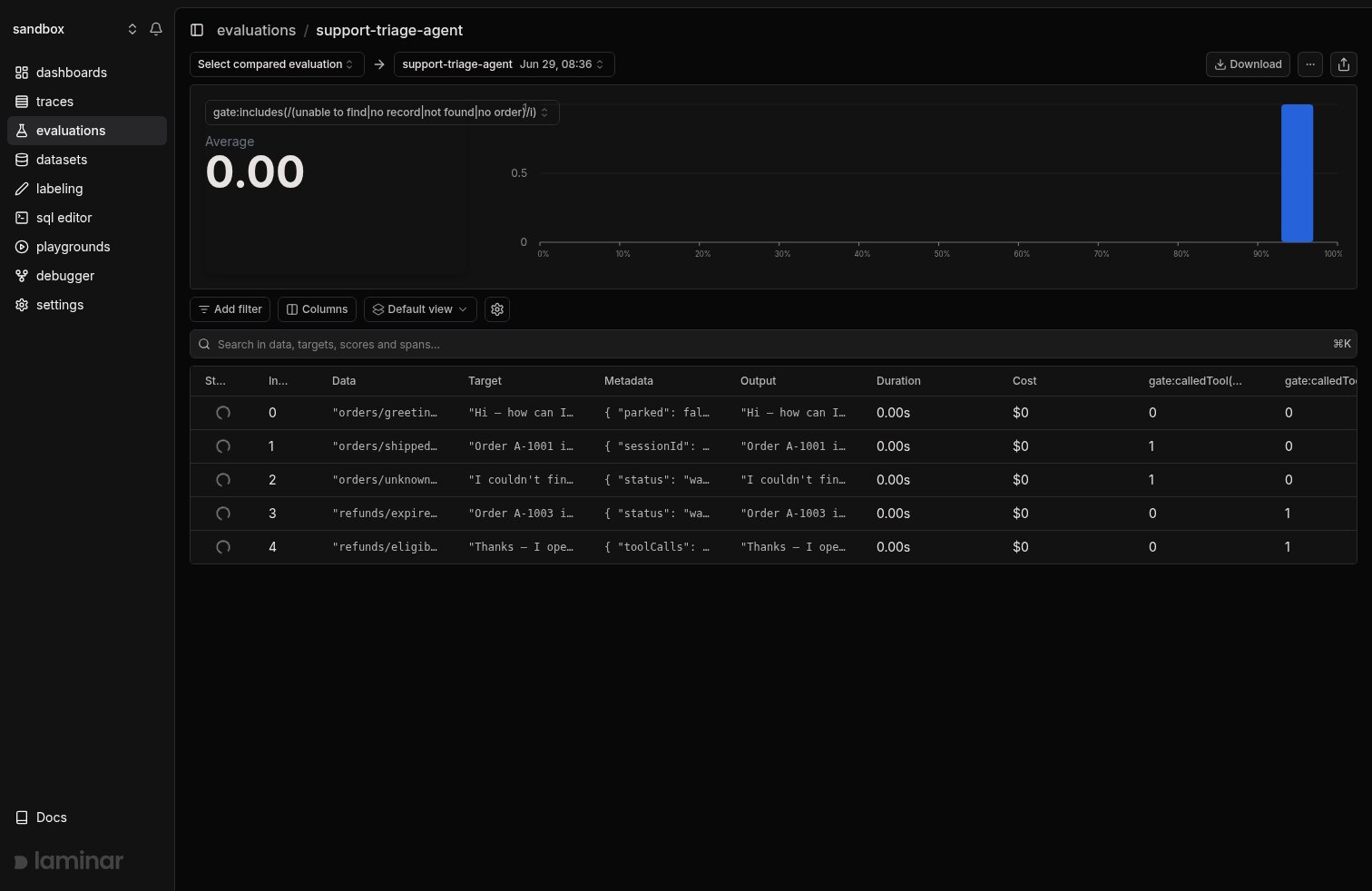
One eve run: the gate score selected at the top reads 0.00 because orders/unknown-order failed it, and each datapoint row carries its eval id, the agent's final output, and eve's verdict in metadata
groupName stays stable, changing a prompt or model and rerunning lands the new run in the same group, and Laminar charts each score dimension over time. A gate that flips from 1 to 0, or a soft score that drops, is a regression you caught before shipping. See Compare runs for side-by-side diffs and per-datapoint deltas.
Query the results
eve evaluations are stored like any other Laminar evaluation, so you can query the datapoints across runs:- SQL editor:
SELECT simpleJSONExtractFloat(scores, 'gate:succeeded') FROM evaluation_datapoints WHERE ... - SQL API: the same query over HTTP.
- CLI:
lmnr-cli sql query. - MCP server: ask an agent to query your evaluations.
Next steps
Compare runs
Group eve runs, read the progression chart, and diff them side by side.
Concepts
The datapoint, score, and group model the reporter maps eve onto.
Manual API
The lower-level evals API the reporter is built on.
SQL editor
Query gate and soft scores across every eve run.